


Spoly: Sports Card Scanner
4.882.00 Reviews
App Specs
- Version
- 1.2.1
- Updated On
- License
- Free
- Downloads
- 10,000+
- Developer
- Scaling Engine Limited
- Categories
- Lifestyle
- Platform
- Android
Screenshots
 Analysis by AppCompare
When I first opened Spoly, I approached it as someone who wanted less guesswork around a sports card collection. The idea is straightforward: use one place to identify cards, get a valuation view, and keep track of what you own. That combination makes sense for anyone whose collection has grown beyond a few cards in a drawer, especially when remembering editions, players, and purchase details becomes difficult.
This is a free lifestyle app from Scaling Engine Limited, aimed at sports card collectors rather than general budgeting or shopping. It is available for users aged Everyone, and the current release is version 1.2.1 for devices running Android 8.0 or later. Its store presence is still relatively modest, with over ten thousand installs, but the average rating sits at 4.7 from around one thousand ratings. I would not treat those figures as a substitute for personal testing, yet they do suggest that the basic idea is connecting with its intended audience.
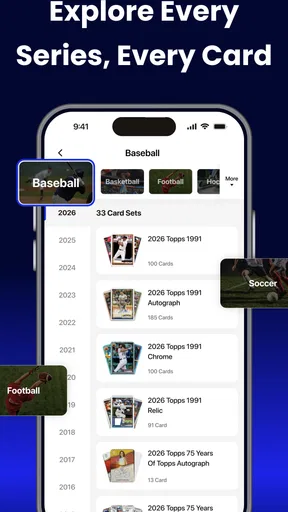
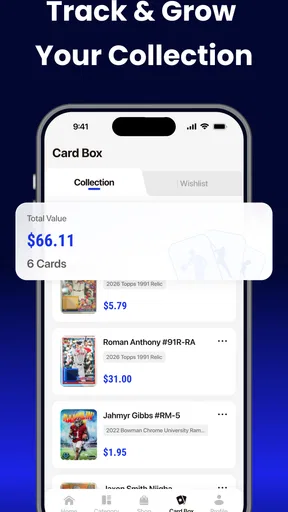
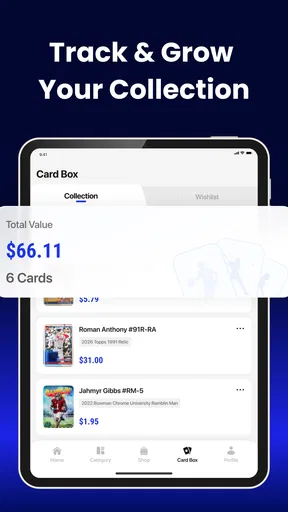
My overall impression is that the app is most useful when I treat it as a collection workbench, not as an automatic expert that can settle every card question instantly. Scanning or identifying a card can give me a practical starting point, while the collection side helps turn scattered items into something I can review and manage. The real benefit appears when those two jobs are used together.
Getting from installation to a useful collection view
I would start by treating Spoly as a place to build a dependable record, rather than simply a camera pointed at a stack of cards. In this section, I’ll focus on a low-risk first session: choosing a few varied cards, checking what the app recognizes, and deciding which entries are ready to keep. That small routine makes it easier to spot where careful review matters before the collection grows.
What the first launch feels like
The first thing I would tell a new user is to begin with one card, not an entire box. That sounds obvious, but it makes a meaningful difference. A single card lets you learn how Spoly interprets the item, where its valuation information appears, and how the collection workflow fits together before you commit time to a large batch.
Because the app combines identification, valuation, and collection management, it helps to separate those purposes in your mind. Identification answers, “What might this card be?” Valuation addresses, “What kind of value is associated with it?” Collection management answers, “How do I keep this item organized for later?” Those are related questions, but they are not identical. A card can be identified correctly while its condition, version, or market context still needs your attention.
I also recommend having a small group of cards ready that you already know reasonably well. That gives you a useful comparison point. If you recognize a player, set, or design, you can judge whether the result looks sensible instead of accepting every result without checking it. This is one of the most important habits for first-time users: use the app to reduce research time, not to replace your own final judgment.
Worth Reading Before You Choose

Flipboard Shows What News Apps Must Do Beyond the Feed

Switching to Android Auto Means Rethinking Your Driving Routine

Google Calendar Makes a Crowded Week Easier to Manage

Ludo King Makes the Most of the Minutes Between Plans

Baby Panda World Brings Quick Play to Modern Phones, but Its Game Library Feels Busy

ESPN’s Live Game View Makes Following Close Games Easier
Setting up a practical starting routine
There is no need to begin by cataloguing everything you own. I found the more sensible approach is to create a small test collection made up of cards from different situations: one easy-to-recognize modern card, one older or less familiar card, and one item whose value you are particularly curious about. This gives the app a fairer trial than scanning several nearly identical cards.
Before scanning, I would clean the phone camera lens and place the card on a flat, uncluttered surface. Good lighting matters for any visual identification tool, and a busy background makes it harder to understand whether a disappointing result comes from the card itself or from the capture. I would also keep the card in a protective sleeve if it is valuable, while making sure glare does not cover the name, logo, or key design details.
The free entry point is useful for trying the workflow without making an immediate commitment. At the same time, the app includes in-app purchases priced from $29.99 to $39.99 per item. That is a significant range for a casual experiment, so I would first learn how well the core process fits your collection before considering any paid option. The right question is not simply whether extra functionality sounds attractive; it is whether you will use the app often enough for that cost to make sense.
The first successful scan
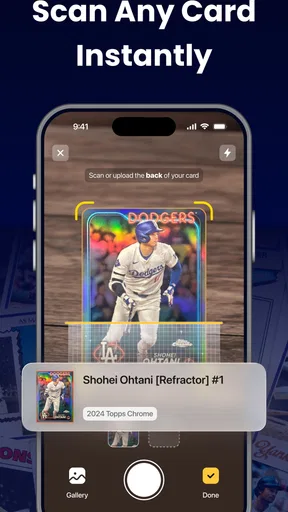
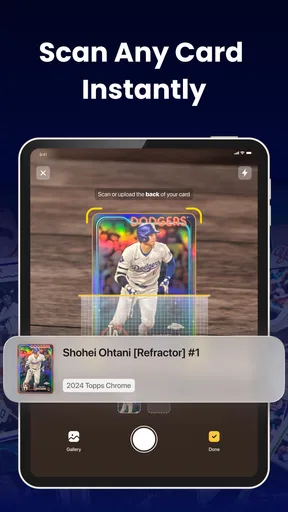
For a first meaningful success, I would choose a card with clear, readable visual details rather than the rarest card in the collection. Hold the phone steadily, frame the card so its important text and artwork are visible, and give the app a moment to process the image. If the result looks plausible, inspect the details instead of immediately moving on.
This inspection step is where the app becomes more useful than a simple camera shortcut. I would compare the identified player, team, design, and apparent release context with the physical card. Small differences can matter in collecting, particularly when cards share a similar layout. A parallel, insert, special edition, or variation may look close to a standard card at a quick glance, so the first result should be treated as a candidate identification until the visible details line up.
Once the card appears correctly identified, add it to your collection and use that entry as a reference for the next cards. The advantage of this order is that you are building a record while learning the recognition process. You are not merely checking prices and then losing the information again. Over time, the collection view should become the place where you return to see what you have already examined.
The best first-session goal is one verified card saved correctly, not a large pile processed quickly. That approach exposes mistakes early and prevents a catalogue filled with uncertain matches. It also gives you a reliable example when you begin checking more difficult cards.
How I would handle valuation information
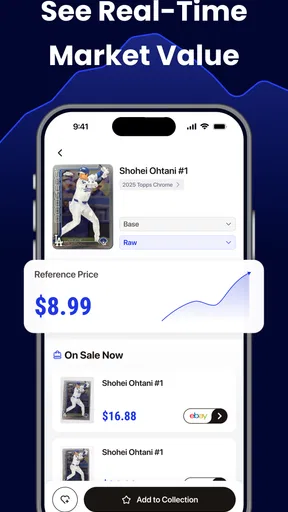
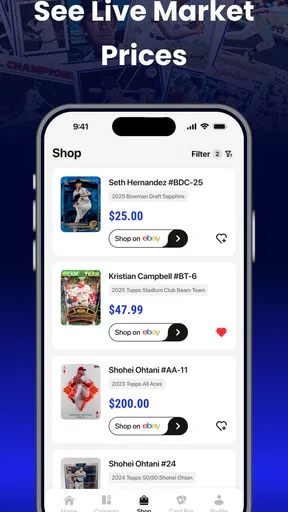
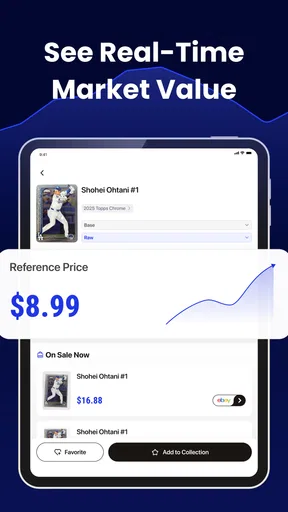
Valuation is helpful when it gives context, but it can be misleading when read as a promise. I would use Spoly’s valuation view to decide which cards deserve closer research, which items may be worth protecting more carefully, and how the collection compares internally. I would not use a displayed figure as the only reason to buy, sell, insure, or trade a card.
Condition is the obvious reason for caution. Two cards with the same player and design can differ substantially because of corners, centering, surface marks, edges, or professional grading. Even when an app identifies the card accurately, a camera cannot turn a quick collection scan into a complete condition assessment. For that reason, I would record the app’s result alongside my own notes about visible wear rather than treating the valuation as final.
There is another practical distinction: a valuation view can help me prioritize attention, but it does not automatically tell me what I should do next. If a card appears more valuable than expected, I would inspect it under better light, verify the exact variation, and store it safely. If the result seems surprisingly low, I would check whether the card was matched to the wrong version before deciding that the item has little interest.
Turning scans into a collection habit
The collection manager becomes more valuable when I use it consistently. My preferred workflow would be to scan a small group, review every identification, save only the entries that look correct, and then stop. That is more controlled than rushing through a whole collection and discovering later that several cards were assigned to the wrong records.
I would also use the app during ordinary collection moments rather than only during a major sorting project. For example, after returning from a card show, I could identify new purchases while the packaging and purchase context are still fresh. When preparing for a trade, I could review the saved collection instead of opening boxes one by one. If a relative asks what cards I have, the organized record is easier to consult than a memory-based answer.
A less obvious use is deciding what not to keep in the active workflow. Collections often contain duplicates, damaged cards, cards awaiting closer inspection, and items that belong to someone else. I would avoid saving uncertain cards as if they were confirmed. Keeping a small “check later” group outside the confirmed collection, using whatever organization the app makes available, is safer than allowing guesses to become permanent records.
Common points of confusion
The most likely confusion is expecting every scan to be perfect. Sports cards are full of near-identical designs, variations, reprints, inserts, and cards where the important distinction is not obvious from the front. If the result does not match the physical card, I would not repeatedly scan from the same angle and hope the answer changes. I would improve the lighting, reduce glare, show the relevant text clearly, and compare the returned details with the card before trying again.
Another point is the difference between a card’s identity and its condition. Spoly can help me organize the first question, but the second still requires careful observation. A clean-looking image does not prove that the card is mint, centered, or professionally graded. This matters most when the valuation appears high, because that is exactly when a rushed assumption can become expensive.
It is also easy to confuse a collection record with proof of ownership or authenticity. A saved entry tells me how I have organized an item in the app; it does not independently establish where the card came from or whether it is genuine. For valuable purchases, I would keep receipts, seller details, and any relevant documentation separately.
Some users may also wonder whether the app is suitable for every kind of collector. I think it is strongest for people who want a practical digital inventory and a faster way to investigate cards. It is less suitable for someone who only owns a few cards and never needs to revisit them, or for an advanced collector who requires highly specialized grading records, transaction accounting, or a fully customized database. In those cases, a spreadsheet, dedicated desktop catalogue, or specialist marketplace tool may offer more control.
Where it compares well with familiar alternatives
The usual alternative is a spreadsheet. A spreadsheet gives excellent control over custom fields, purchase costs, sale prices, condition notes, and personal categories. It is also easy to back up and adapt. What it does not provide as naturally is the capture-to-identification path. Spoly’s appeal is that it brings the visual starting point and the collection record closer together, which can save time when I am processing cards I do not recognize immediately.
Another alternative is searching each card manually through a web browser or marketplace. Manual research can be more thorough, especially when I need to compare recent listings, confirm a variation, or investigate condition-sensitive sales. The trade-off is time and repetition. Spoly is more convenient for the first pass, while browser research remains better for a final decision involving money.
There are also general inventory apps. They may be excellent for household possessions, receipts, or broad asset tracking, but they are not built around the visual language of sports cards. A lifestyle app designed specifically around card identification and valuation feels more focused for this task. Still, focus can also mean limits if your collection management needs extend into detailed accounting or unusual memorabilia.
Who will get the most from it
I would recommend Spoly to a beginner who has inherited a box of cards and wants a calm way to understand what is there. It can also suit an active collector who buys frequently and needs a central record, or a casual seller who wants to sort likely high-interest cards before doing deeper research. Families can benefit too: scanning together gives children a structured way to learn about a collection, while the Everyone age rating makes the app approachable for a broad audience.
It is particularly useful when the collection is too large for memory but not so specialized that every entry requires professional-level documentation. The combination of identification and valuation helps answer the first practical question—what deserves attention—while the collection manager helps prevent that attention from becoming a one-time exercise.
I would skip it if your main goal is a guaranteed selling price, a grading replacement, or a complete financial ledger. I would also be cautious if you rarely collect and do not expect to maintain records. In that situation, the setup and review time may outweigh the convenience of having a catalogue.
A sensible second session
After the first successful card, I would not immediately scan the most valuable-looking items. I would process a small, mixed batch and compare the results. Pay attention to recurring trouble spots: cards with reflective surfaces, similar designs, tiny printed differences, or incomplete visibility. This tells you where your collection needs manual verification.
Then I would establish a simple rule for saved entries: only confirmed matches go into the main collection, while questionable results wait for another look. If the app offers a way to edit or organize records, use that opportunity to make names and categories consistent from the beginning. Consistency matters later, when you are trying to find duplicates or review a particular group.
For a larger collection, work in sessions rather than treating the task as a single weekend project. A manageable rhythm reduces fatigue, and fatigue is when visual mistakes become most likely. I would also photograph or store especially important cards carefully outside the app, because a digital record is most useful when it supports—not replaces—the physical care of the collection.
My final view of the experience
Spoly: Sports Card Scanner has a clear practical purpose, and I like that its identity, valuation, and collection tools point toward the same everyday problem: knowing what is in your collection and deciding what deserves closer attention. The free starting point makes it easy to test the workflow, while the current version gives first-time users a focused place to begin. Its rating of 4.7 and growing install base are encouraging, but the value will depend heavily on how well its identification process fits the cards you actually own.
My advice is to start slowly, verify each result, and use valuation as a guide rather than a guarantee. If you want a quick first pass through an unorganized sports card collection, the app can be genuinely helpful. If you need advanced accounting, detailed grading documentation, or complete control over every field, pair it with a spreadsheet or specialist research method instead.
For me, the strongest reason to try it is not the promise of discovering a valuable card in seconds. It is the more realistic benefit of turning a confusing stack into a searchable, reviewable collection. Use Spoly as the beginning of a careful collecting workflow, and it becomes much more useful than a one-tap valuation check.
Pros
- Quickly identifies many sports cards using the phone camera.
- Useful for organizing large collections into a digital catalog.
- Supports price checking to help estimate a card’s market value.
- Can save collection details for easier tracking and management.
- Helpful for spotting potentially valuable cards while sorting.
Cons
- Recognition accuracy may drop with damaged
- rare
- or poorly lit cards.
- Market prices can change quickly and may not reflect actual sale values.
- Some features may require a paid subscription or in-app purchase.
- Scanning cards one by one can be time-consuming for very large collections.
- Coverage may be limited for obscure sets
- players
- or non-US cards.
FAQs for Spoly: Sports Card Scanner
What is Spoly: Sports Card Scanner used for?
Spoly: Sports Card Scanner is designed to help collectors identify and organize sports trading cards using a mobile device. After scanning a card, the app can provide information such as the player, set, year, and estimated market value when data is available. It is useful for quickly reviewing a collection, checking cards before buying or selling, and keeping track of potentially valuable items.
How accurate is Spoly when identifying sports cards and estimating their value?
The app can make card identification much faster, but its results should not be treated as guaranteed. Recognition may be affected by lighting, camera focus, card condition, unusual editions, autographs, parallels, or cards that are not included in its database. Estimated prices can also change frequently and may differ from actual sale prices, so users should verify important details through trusted marketplaces and professional grading information.
Which sports cards and marketplaces are supported by Spoly?
Spoly’s coverage depends on the sports, brands, sets, and databases supported by the current version of the app. Popular modern cards are generally more likely to be recognized than rare regional releases, older issues, custom cards, or newly released products. Marketplace and pricing information may also vary by country and platform. It is best to check the app’s current listing and in-app coverage before relying on it for a complete collection.
Does Spoly require an account, internet access, or a subscription?
Some features may require an internet connection because card recognition, collection syncing, pricing data, and database searches can depend on online services. The app may also offer account-based features or optional premium tools, such as expanded scans, advanced collection management, or additional market information. Before downloading, review the current App Store or Google Play description to confirm registration requirements, free limits, trial terms, and subscription pricing.
Can Spoly replace professional card grading or authentication?
No. Spoly is a convenient research and collection-management tool, not a professional grading or authentication service. A scan cannot reliably confirm whether a card is genuine, determine its exact condition, or replace an evaluation from a recognized grading company. If a card has significant financial or sentimental value, compare the app’s information with reputable references and consider professional authentication or grading before making an important purchase or sale.


